Everything I know about the technical side of Bitmojis
A lot of this is entirely undocumented and cannot be found in many other public places. I will
do my best to guess while teaching. All Bitmojis and IDs featured are strangers and have no
connection to me or each other. See the links section for credits. I have
been running the Wayback Machine extension during this whole process, so a lot of the
information, ranging from rendered Bitmojis to community research, is preserved.
TODO
- Interactive examples using placeholders and build script
- Finish "render" engine
- Finish "cPanel" engine
Styles
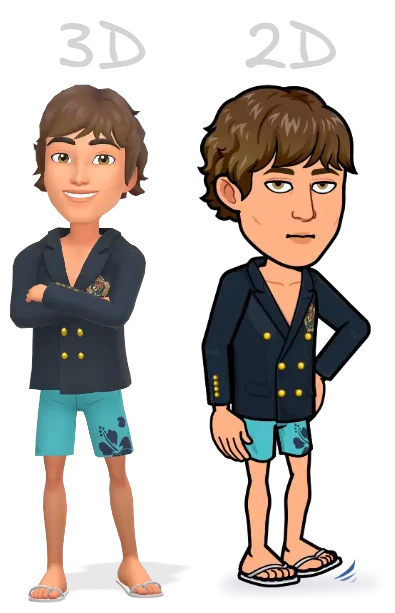
As best as I can tell, there are two styles:
- The new 3D style, the new default
- The legacy 2D style, hidden off Snapchat and Bitmoji
The IDs for the new poses are randomly mixed in with the old poses. A good way to filter to
show only new 3D poses is to set the scale to 3 and above or use a special
Bitmoji ID that seemingly randomly only works with 3D poses.
IDs
Seemingly random IDs? Well, first of all, what kind of IDs are there? Some of the below IDs
can be found in the response of an authenticated request to
https://web.snapchat.com/ami/friends. (Hint: open
Snapchat for Web, open the developer tools' network
tab, filter by that URL, and reload the page.)
-
User ID, user_id: A Snapchat user's primary ID, unrelated to their Bitmoji.
A standard UUID such as 72759520-784f-4a43-a417-da7771ec1d37.
-
Bitmoji Avatar ID, bitmoji_avatar_id: The main ID for a Bitmoji. Contains
three parts: the real ID, the version, and an unknown "s-value". Consider the following:
99430331323_50-s5. Using regex to separate the parts
([0-9]+)_([0-9]+)-(s[0-9]+), group 1 is used to identify the Bitmoji user
(in contrast to a snapchat user, not the same thing), group 2 iterates through all past
versions of the Bitmoji, with the most recent being 0 or the highest (and
hence latest) version, and group 3 is the "s-value"; its purpose is unknown. Its value
always seems to be 5, but can vary, seemingly at random. See
Nuances - S-value for more info. When I refer to the avatar ID,
it will only be to the unique ID, not the version or the s-value.
-
Bitmoji Selfie ID, bitmoji_selfie_id: This ID is not related to the user
directly, but rather the user's chosen selfie style. It is what I will call a "Pose ID"
later on and dictates the expression/pose shown as their chat profile picture. It is
simply a random integer: 582513516.
-
Bitmoji Scene ID, bitmoji_scene_id: Similar to the Selfie ID, this ID is
not user-specific but is set by the user through their choices. It refers to the pose
shown on the maximised user profile. A random integer: 6784913.
-
Bitmoji Background ID, bitmoji_background_id: The ID for the background
image of the user's profile, as chosen by the user. It's a random integer:
930679260.
-
Template ID, template_id: Seemingly internal, not useful to the user.
Doesn't seem to work with any URL style. A random, noticeably smaller, integer;
4509.
-
A mysterious, unnamed type of ID, the dw ID. A string of random characters;
74744d1a5a11aa42cce8, found in places like the
notloaded__bitmoji image of Snapchat for web. Uses a different base URL
than all others. The most system-y of all, used for the adorable cat on the laptop, and
for other things like "how to allow notifications" and such.
-
Stickers
-
Comic ID, comic_id: Comic ID, Pose ID, Bitmoji ID - I call it many things.
I find it easiest to think of it as a pose ID, as it controls things like your
expression and the action of the Bitmoji, but also things like the scene around your
Bitmoji, the costume, and more. A random integer: 20082806. It covers
-
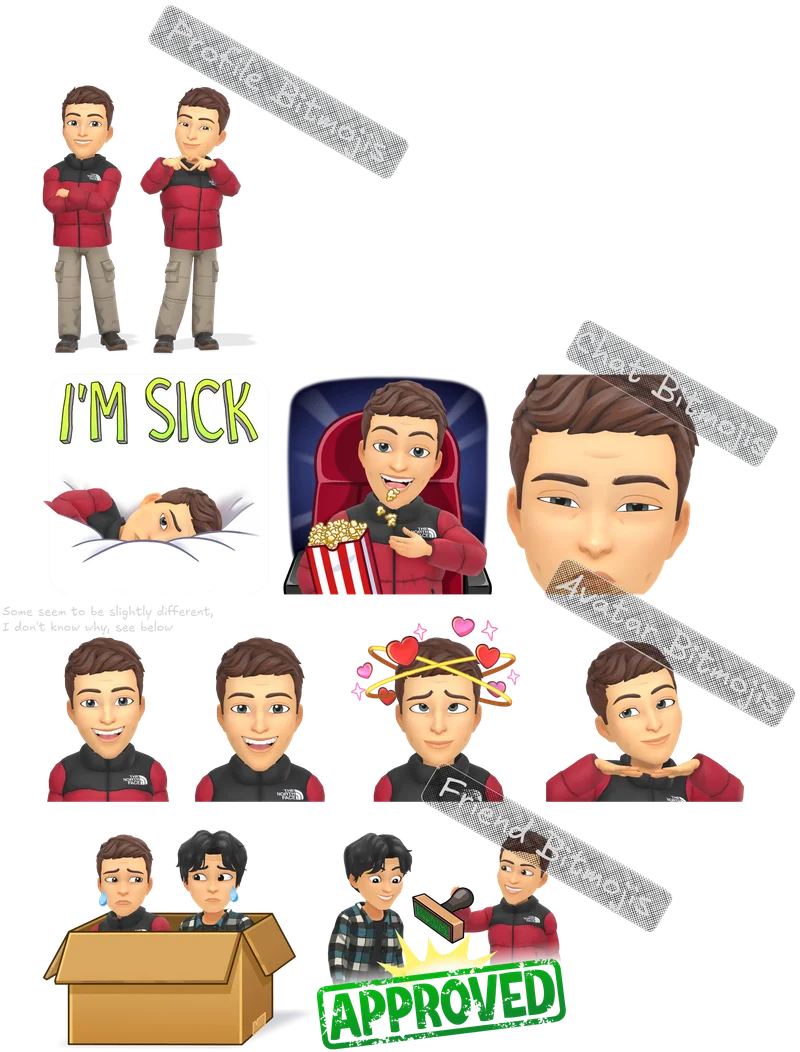
"Chat Bitmojis" - The main, non-system, chat-facing kind, usually shown as little
scenarios, found in the templates API.
-
"Avatar Bitmojis" - One of the system Bitmojis, usually a headshot with a specific
pose, not found in the templates API.
-
"Profile Bitmojis" - Another system Bitmoji, usually a full-body shot with a certain
pose and/or expression, again not found in the templates API.
-
"Friends Bitmojis" - A variant of "Chat Bitmojis", it takes in two avatar IDs and
combines them into one image, usually shown as scenarios as well. See
Friends Bitmojis with no friends for
other info. Found in the templates API.
"Below"
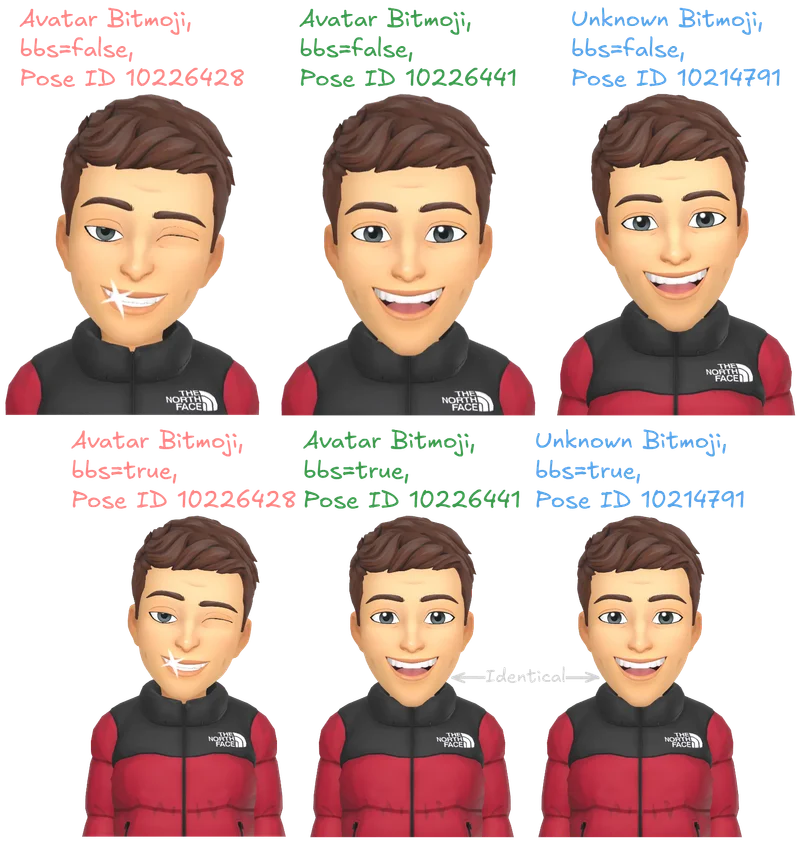
Yes, there are some Bitmojis that look very similar to the "Avatar Bitmojis", but they are
not. I know this because, from my testing, adding the "bbs=true" query param to the Bitmoji
URLs, any non-avatar Bitmojis will render as a special default (the bbs version of
10226441 actually), and because, well, they look different. These may be a 5th
category of Bitmoji, as they also don't appear in the templates API, and they don't seem to
be "Profile Bitmojis" (the other kind that doesn't appear in the templates API). "bbs" will
be explained in more detail later.
URLs
There are many types of URLs, different kinds for each engine and even other kinds of
assets. The URLs for logically grouped Bitmoji usually have the same common pattern, but it
can still be confusing.
Engines
There are 3 types of "engines" that generate Bitmoji. See
Libmoji's Rendering-Engines Wiki. I focus more on Bitmoji displaying rather than creation/customisation and the odd
nuances.
-
The Preview Engine, which allows for customization of the Bitmoji's appearance, and is
used in the Bitmoji editor. It does NOT take any kind of Avatar or Pose ID, but rather a
series of query parameters
to manually describe the Bitmoji.
-
The cPanel Engine, not important nor used. Most of the Bitmojis I've seen are generated
by the next engine, but funnily enough, only take advantage of the cPanel Engine's
customisation options, such as transparent and scale. Unlike
the Preview engine, it DOES take both a Pose ID and an Avatar ID. cPanel stands for
"Comic Panel", hence the inclusion of comic_id (or Pose ID, etc - see
IDs - Comic ID) internally at Bitmoji.
-
The Render Engine. The default used across Snapchat and Bitmoji. It also takes an Avatar
ID and Pose ID and supports the same options as the cPanel engine with a few extras,
such as sex and pd2. I have not tested these, but they
supposedly allow Preview Engine-like customisation, albeit with "legacy" traits.
Base URLs
There are many base URLs for Bitmojis, with each engine, and other assets, getting their own
base URL (or multiple!).
Render Engine
https://cf-st.sc-cdn.net/3d/renderhttps://images.bitmoji.com/3d/renderhttps://render.bitstrips.com/renderhttps://sdk.bitmoji.com/3d/render
In the first three URLs, render can be replaced with avatar, but
3d is required. In the last one, 3d can be omitted entirely while
render is still present, OR render can be replaced with
avatar while 3d is still present.
cPanel Engine
https://render.bitstrips.com/v2/cpanel
Not much to talk about here luckily. It takes a comic_id and an
avatar_id. It also has optional query parameters such as
scale ([0-2]) which controls the resolution, transparent ([0-1])
which seems to not work anymore as it's always transparent, style which also
seems to do nothing, and as mentioned in the Libmoji wiki, the palette query
parameter which, yet again, seems to do nothing. This engine can be considered a legacy
engine and deprecated. Example template:
${render_base_url}/${comic_id}-${avatar_id}_${avatar_version}-s5-v1.[webp|png]
Preview Engine
https://preview.bitmoji.com/bm-preview/v3/avatarhttps://preview.bitmoji.com/avatar-builder-v3/preview
A Preview Engine URL is basically a long series of query parameters, with only two mandatory
configurations:
-
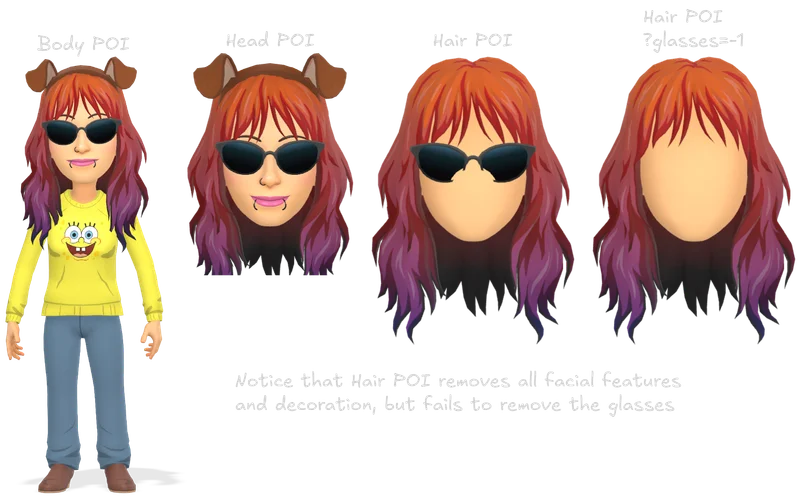
Point of interest, ${base_preview_url}/${poi}. Mandatory.
-
Various body areas to focus on, possible values are
hair,
eye, eyebrows, nose, jaw,
head, body, mouth, and a lot more. Some, but
not all, of these remove "distracting" elements from the preview to better showcase
the POI, but this can sometimes cause unexpected results. (This is not an issue with
the way these POIs are normally used, they disable all unrelated configurations
(either by setting them to -1 or omitting them), or if that's not
possible, a reasonable default, instead of relying on the Preview Engine to do so.)
-
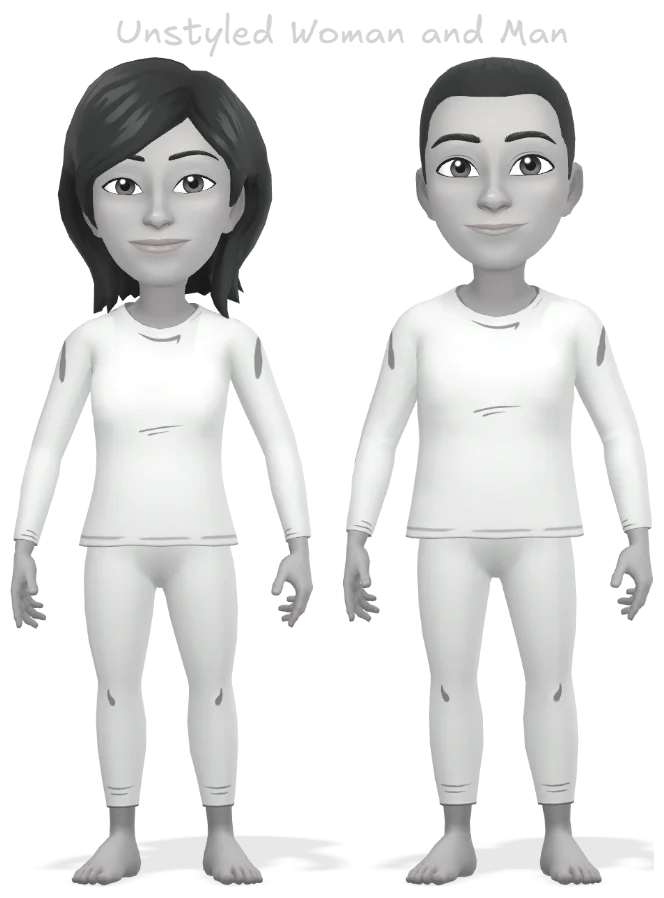
Gender, ?gender. Mandatory.
-
Possible values are
1 and 2 for male and female,
respectively. Bad Snapchat, not very progressive of you.
-
Scale, &scale. Optional.
-
Controls resolution of the preview. Possible values are [0-3] with
3 not
throwing an error but rendering the same size as 1.
-
Outfit, &outfit. Optional.
-
Overrides all other clothing options excluding the head, except when the internal
has_custom_head for that outfit ID is true. It is a random
integer: 1018224. Both genders (as defined by Bitmoji) have separate
lists for outfits they can wear, but they do share many. In the new assets JSON file,
there are two types of outfits, 0 and 1. Outfits with an outfitType of 0
are the "regular" outfits, applied using the &outfit query parameter
and their corresponding ID. Outfits with an outfitType of 1 are what I'm
calling "composite" outfits, which supply the outfit in the form of a
detailedOptions object, which specifies the individual customisable
pieces and their values.
-
Customisation values. Optional.
-
This section is for all of the other query parameters the Preview Engine supports,
such as
hair, pupil_tone, top,
earring and more. The supported values are documented in the Assets API
(a version of which is now outdated, see
links I've found for the new URLs I've found). See
Nuances - Customisation values for more info.
URL template:
${preview_base_url}/${poi}?gender=${gender}${...other_query_parameters}
Others
If it wasn't already complicated enough, there are even more Bitmoji-related URLs!!
A sticker uses the https://sdk.bitmoji.com/me/sticker URL, and a background
uses https://sdk.bitmoji.com/3d/background.
Stickers are…a total guess for me. I'm making up these names based on clues scattered around
the internet and minified code.
Key: avatar_id_with_version
Values: "avatar_id_version-s5",
"avatar_version_uuid", "alternative_avatar_version_uuid"
Examples: 131457743_49, 512001e4-fedb-4894-815f-f8f24433528c,
AWVscGhvWez65Dau7FgShF5VPT5C7A
Key: sticker_id
Value: "sticker_id", "sticker_uuid"
Example: 20082713, 0e7afb8b-14de-4d30-8498-a00cfe20fa4d
Notes: Not all stickers support two avatars. Also, this sticker_id seems to be
the same as a Pose ID/Comic ID in other Bitmoji contexts. Most of the sticker IDs I've found
from an authenticated request to
https://us-east-1-bitmoji.api.snapchat.com/direct/pack/popular are found in the
templates API, but many are not.
URL Patterns:
${base_sticker_url}/${avatar_id_with_version}-
${base_sticker_url}/${avatar_id_with_version}/${sticker_id - supports 1}
-
${base_sticker_url}/${avatar_id_with_version}/${sticker_id - supports
						2}/${avatar_id_with_version}
Thank God backgrounds are not that complicated.
3d/background/([0-9]+)-([0-1]).([webp|png])
- A background ID
- A background size
- An image type
https://images.bitmoji.com/3d/background/135680541-1.webp
Nuances
There is a lot I, and everyone else, do not know about Bitmojis. Nuances will cover…nuances.
Things I can not explain, or that are inconsistent with no observable patterns, or simply do
not fit anywhere else. These are largely useless to both the end user and the developer
curious about the technology, but I think it's fun to explain them.
S-value
The s-value, for the most consistent results, should be set to 5.
That being said, for 3D Bitmojis, it can be multiple values, including, but possibly not
limited to, 1, 4, and 5. This is, of course, not the
case for 2D poses, which seem to be always 5, no matter what.
3D-exclusive
It's hard to explain this one. Some user IDs seem to be exclusive to 3D poses, while others
will happily work with both 2D and 3D poses. I suspect this is a coincidence, based solely
on the fact that Bitmoji would have stopped updating old 2D poses, and thus if an avatar has
a new piece of clothing or a new hairstyle, etc., it would fail to render a valid 2D pose.
Unfortunately, this is near impossible for me to test, as my Bitmoji is currently
(2025-05-09) dead.
It is also worth noting that even with the "2D templates" file accessed from the Internet
Archive, some Bitmoji's 3D versions fully replaced the 2D versions, using the same
comic_id and thus those 2D versions are lost. An example of this is the
"Blowing up a balloon that says H B D" Bitmoji, which used the same ID
(10134294) for both the 2020 2D and 2025 3D versions.
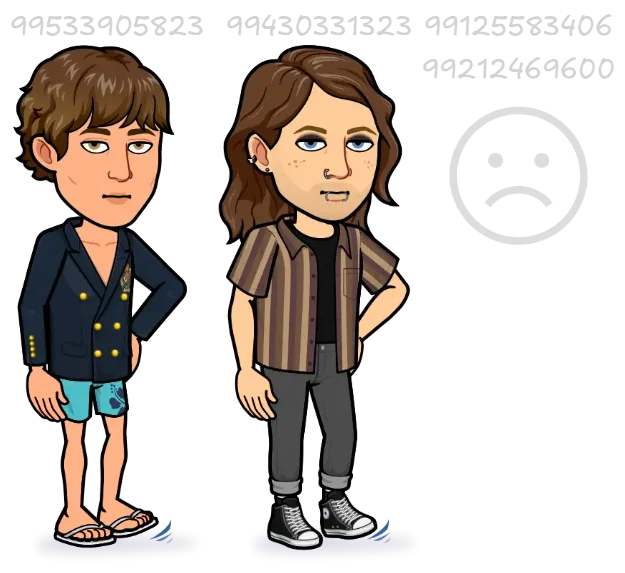
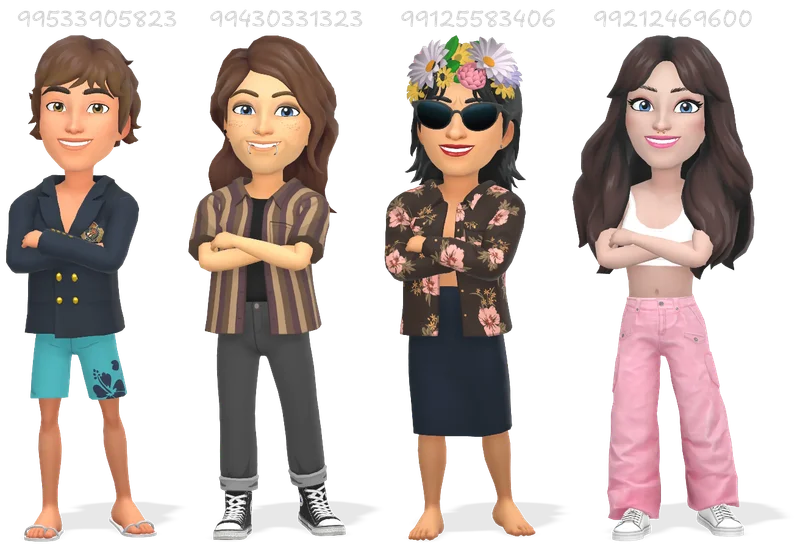
The below example's URL template,
${render_base_url}/10211914-${avatar_id}_0-s5-v1.webp?scale=2&ua=2, shows
two Avatar IDs failing to render a valid 2D pose, and those same ones succeeding to render a
valid 3D pose.
Friends Bitmojis with no friends
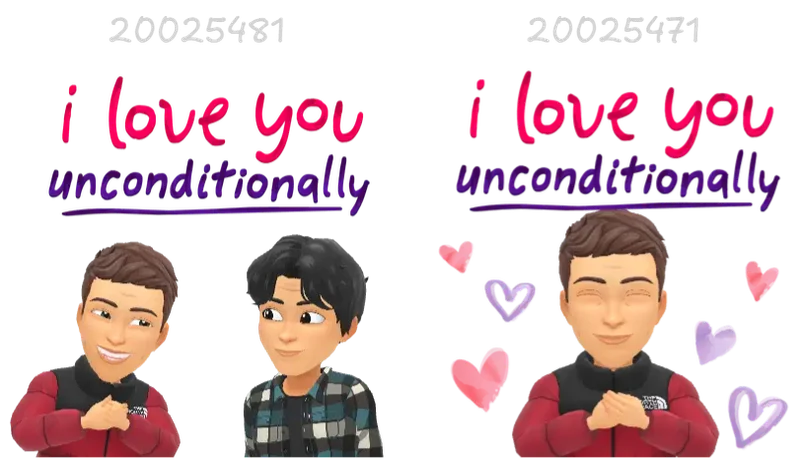
Most Friend Bitmojis have a complimentary Chat Bitmoji with a matching single-person
scenario. A semi-reliable way to find the complimentary Chat Bitmoji is to search for the
Friend Bitmoji's tags and/or alt text. It is likely the single-avatar version will have the
same tags, but it's not guaranteed, especially as they seem AI-generated. The IDs might also
be nearby, as shown below.
The limits of time travel
"There is a limit to this backward research, and at some point you’ll roll back to a number
and suddenly the avatar will reverts to the current one." - hatless1der. This is true, but
only for some Bitmojis. I have managed to go from version 86 all the way back to version 1
for some people, and from version 248 all the way back to version 14 before reverting began.
It is worth noting that the avatar versions that do revert were not only the current
version, but also the previous few versions too. That makes me think it's time based (time
since a version?, a fixed date where they were purged?). As always, Bitmoji is inconsistent.
Customisation values
Some of the values for the Preview Engine's customisation options can be weird, but can also
be helpful in the way they are chosen. All customisation options with "tone" in their name
accept a colour value in the 24 bit packed format (otherwise known as decimal, or simply
numbers 1 to 16 million or so), implying that the "IDs" are actually colours, and not
random. No one has tested this before, but I have, and I can confirm that in addition to the
documented values, all 24 bit packed colours work. HOWEVER, there are of course exceptions.
-
If you use a custom colour on the
hair_tone option without a
brow_tone option present (and set to a value greater than 0, and loosely a
valid colour), the URL will error. This is not the case for any of the other "tone"
options, or for "official" values for hair_tone.
-
skin_tone doesn't error with a custom colour, the colours seem to be
"rounded" in a lot of cases. This means that even though you can get previously impossible
skin tones, it is limited to only a few dozen.
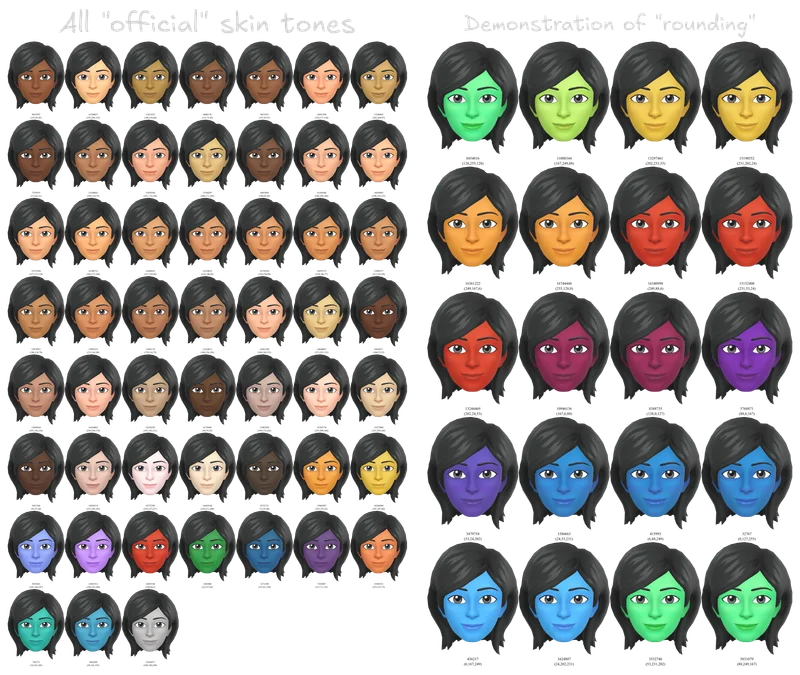
In addition to custom colours in URLs, this information can even be used to add a custom
colour to your official and public Bitmoji, giving you customisation options previously
impossible, and are likely unique to only you. I have not seen this documented anywhere at
all, but it is possible, and I am testing its limits. I have done thorough
testing, and it works. You can create a bitmoji with fully custom colours, and it will be
properly displayed throughout snapchat. With of course, some nuances!
Custom colours in Bitmojis
As mentioned above, Preview Engine URLs have special requirements for custom colours. This
causes issues when you try to edit your Bitmoji. The only place you can feasibly use custom
colours is in the Bitmoji editor's website, where you have easy interception of the
requests. The issue is that edits made on the Bitmoji website do not trigger an update for
Snapchat, so your customisations are not reflected properly. Snapchat never knows that you
have a new version of your Bitmoji, and so in the UI and when you go to customise your
Bitmoji on the Snapchat app, it will use the previous version of your avatar.
To get around this, follow these steps:
-
Set up the request interception to replace your chosen customisation target with your
chosen customisation value.
-
For example, if you want to change your iris colour to pure white (normally
impossible), you can set up the request interception to replace
option_ids.pupil_tone in the "avatar" request with
16777215 (white, #FFFFFF).
-
This is not important enough for it's own section but what Bitmoji internally calls
the "pupil" actually refers to the iris. The pupil is the dark part in the center of
your eye that lets in light, and the iris is the coloured ring around it. This
decision confuses me.
-
In the Bitmoji editor, make any other customisations you want, or simply leave them be,
and then click "Save". You can inspect the request in the network tab to see if your
customisations were applied.
-
Create a clean install of the Snapchat app. I do this in three main ways:
- Uninstall the app, then reinstall it.
- Clear the app's data.
-
And to avoid messing with my main app; Using a test Snapchat account inside Samsung's
"Locked Folder" feature to essentially create a second isolated environment.
-
Open your profile, tap in the area where your Bitmoji is displayed, then tap "Avatar".
Or, yknow, just do what you normally do to edit your Bitmoji.
-
In the Bitmoji editor, make any kind of customisation you want, but importantly you must
a) Not overwrite any customisations you made in step 1.
b) Choose at least one customisation option that is different to your previous avatar.
You may see your custom colours appear in the preview, or you may not. That is not
indicative of whether or not your customisations were applied.
This will trigger an update for Snapchat that there is a new version of your Bitmoji,
and by forcing it to use the customised version it will happily pass your custom colours
along to their servers.
-
Be happy knowing you have colours that possibly no one else in the world has.
Check out Long Stuff for code examples.
Links
Resources that have helped me. I discovered a lot of this knowledge independently, only to
later find others on a similar path, but I want to link to them anyway.
- Matthew Nau's Libmoji
- Libmoji's Wiki
-
BitmojiForDevelopers' Docs
-
Josh Cheek's "Figuring out the bitmoji API", Live site
-
Jordan Poles', featuring Josh Cheek and charcoalheather, "bitmoji", Live site
-
Khoji ("Tracker", "Searched" in Urdu), Live site
-
A Snapchat OSINT Tip: Viewing Bitmoji Changes
-
Grabbing old Bitmoji outfits with BACKMOJI, Live site
- Templates API
- Assets API
- Bitmoji's Online Editor
-
The Wayback Machine - Used to get a working version of Libmoji's wiki and 2D poses'
template data
-
And my poor Bitmoji, which has been blocked, likely because of massive amounts of
requests, before I realised most of the IDs I was looking for were public (including 2D
poses via the Internet Archive) in one place. Don't try to brute force random IDs; it's
not worth it.
Long stuff
Possible customisation options
earring, "context": "DUAL"earring, "content": "LEFT"earring, "content": "RIGHT"nosering, "context": "SINGLE"browring, "context": "LEFT"browring, "context": "RIGHT"earaid, "context": "LEFT"earaid, "context": "RIGHT"mouthring, "context": "SINGLE"tonguering, "context": "SINGLE"
Internally each of these points to an array of group_ids. Match one to the a
group which then contain an array of colour options (think of these like presets), which
then contain an object with a colours object, which has keys for different
piercing positions such as cartilage3, which finally contains an array of tones
(24 bit packed colours) for the _tone${x} query parameters. You then use this
information to generate a query parameter like
&earringL_cartilage3_tone1=16763909 and the other 3 tones. The same happens
for the other "group" based customisation options.
Full list of POIs
hair, eye, eyebrows, nose,
jaw, head, body, mouth,
earring-left, earring-right, face-lines,
mannequin-left, mannequin-center, mannequin-right,
nosering, browring-left, browring-right,
mouthring, tonguering, body-tongue,
glasses, hat, mannequin-with-head-left,
mannequin-with-head-center, mannequin-with-head-right,
top, bottom, one_piece, footwear,
sock, and outerwear.
Custom colour code collection
This is some of the code I use to get custom colours in the Bitmoji editor.
I am using requestly to intercept and modify the requests. The main rule you need to set up
is:
Type: "Modify request body"
URL equals
https://us-east-1-bitmoji.api.snapchat.com/api/avatar-builder-v3/avatar
Request body - Dynamic (Javascript)
function modifyRequestBody(args) {
    // Default args
    const { method, url, body, bodyAsJson } = args;

    // Make a copy to modify
    const modifiedBody = { ...bodyAsJson };

    // Just a sanity check
    if (modifiedBody.option_ids) {
        modifiedBody.option_ids.hair_tone = 16777215; // White hair
        modifiedBody.option_ids.pupil_tone = 16777215; // White IRIS
        modifiedBody.option_ids.skin_tone = 16777215; // White skin (note: skin tone rounding applies)
        // Etc etc
    }

    // Return as a plain string
    return JSON.stringify(modifiedBody);
}
And to fix the previews for things like hair styles breaking when you have a custom hair
colour:
Type: "Query param"
URL contains https://preview.bitmoji.com/bm-preview/v3/avatar/hair
ADD param brow_tone, value 1